FIX Stellar
What is FIX and how does it work?
- FIX (Financial Information eXchange) = a protocol (like HTTP but for trading).
- Operates in UTC timezone (Enable time sync (chrony) on the EC2 server; operate in UTC. Minimal clock drift is critical for FIX.)
-
It’s text-based, built from tag=value pairs separated by a special character (SOH, ASCII 0x01).
-
Session roles:
- Initiator (AXIA) – Our QuickFIX/J engine connects out from EC2 to BornTec’s FIX host:port.
- Acceptor (BornTec) – BornTec listens for the connection and accepts it.
-
Business roles:
- Producer (BornTec) – They stream trade events (Execution Reports).
- Consumer (AXIA) – We only receive those events; we do not send orders.
-
Once the TCP session is up, FIX messages flow both ways (logon, heartbeats, sequence handling), but the business payload is always Execution Reports from BornTec to us.
- Example of a fix message:
8=FIX.4.4|35=8|34=123|49=BORNTEC|56=AXIA|150=2|39=2|17=EX123|55=ESU5|31=5432.25|32=3|
- Exchange of messages are main communication mechanism between Producer and Consumer
-
Every FIX message contains tag 35 (MsgType), which identifies the type of message. . Message Types:
- A = Logon → handshake at session start.
- 0 = Heartbeat → keepalive every 60s when idle.
- 1 = TestRequest → “are you alive?”
- 2 = ResendRequest → ask for missing messages.
- 4 = SequenceReset → reset sequence numbers.
- 5 = Logout → close session.
- 8 = ExecutionReport → 🚨 main business message (fills, cancels, status).
-
FIX runs as a session over TCP, Sunday → Friday.
- Every FIX message has tag 34=MsgSeqNum, which is a monotonically increasing counter (starting at 1).
- This ensures nothing is lost:
- If a gap is detected -> QuickFIX automatically sends ResendRequest (35=2).
- If the counterparty wants to reset → they send SequenceReset (35=4).
- This ensures nothing is lost:
- BornTec prefers weekly sessions: You set NonStopSession=Y in borntec-fix.cfg file, and BornTec will trigger resets weekly.
- Execution Reports (35=8) is the main report in which all the information about trade are contained.
- QuickFIX/J creates a subfolder for each session (-.seqnums, .body, .header). Messages are written sequentially into .body (message content) and .header (headers). The .seqnums file tracks the current inbound and outbound sequence numbers.
- QuickFIX itself does not “rotate” store files — they grow until you clear or archive them. Important for hdd free space management!
- Logs (FileLogPath) do rotate by day (new files for each session/day).
Execution Reports (35=8)
This is the data feed we care about the most. It contains information about fills, source, product, timestamp, etc.
Execution Reports are sent for every trade event (new order, partial fill, fill, cancel, replace, etc.).
Each Execution Report is a set of tags describing an event, for example:
- 17=ExecID → unique execution ID (per fill).
- 37=OrderID → order identifier.
- 150=ExecType → reason for this execution report (New, Fill, Cancel, etc.).
- 39=OrdStatus → current status of the order (Working, Filled, Canceled, etc.).
- 31=LastPx → last fill price.
- 32=LastQty → last fill quantity.
- 55=Symbol → product symbol (unified by BornTec, derived from official Exchange coding standards).
- 30049=Platform → origin platform of the trade (e.g.
Stellar,TT,CQG). - 30050=Trader → identifier of the trader under Axia who entered the order (not the firm, but the individual Axia trader).
Full tag description can be found here.
Platform-specific notes
- Stellar → no price scaling applied.
- CQG → no price scaling applied.
- TT → price scaling is applied by BornTec only for these markets:
CBCM (CBOE Futures Exchange), DUMX (Dubai Mercantile Exchange), GLBX (CME Globex), MGCB (Minneapolis Grain Exchange), NYMS (NYMEX), NYUM (NYMEX), XCBT (Chicago Board of Trade), XCEC (COMEX – Commodity Exchange Inc.), XCME (CME – Chicago Mercantile Exchange), XFXS (SGX FX Swap – Singapore Exchange), XKLS (Bursa Malaysia), XMGE (Minneapolis Grain Exchange), XNYM (NYMEX – New York Mercantile Exchange)
For TT markets not in this list, no scaling is applied.
Implementation tip: Normalize prices only when 30049=TT and the market (e.g., via 30=LastMkt when present, or your own symbol→market map) is one of the markets above. Otherwise, pass prices through unchanged.
Example Execution Report from Stellar:
8=FIX.4.4|35=8|49=BORNTEC|56=AXIA|34=123|
17=EX123|37=ORD456|150=2|39=2|55=ESZ5|
31=5432.25|32=1|30049=Stellar|30050=Trader123|
What QuickFIX Does For Us
QuickFIX (the library you’ll use): - Handles all the session plumbing: - Connecting to BornTec. - Logon/Logout. - Heartbeats. - Detecting/resending missing messages. - Persists all messages to disk (store/ and log/) - Calls our code only when an application message (Execution Report) arrives.
Sequence Diagram
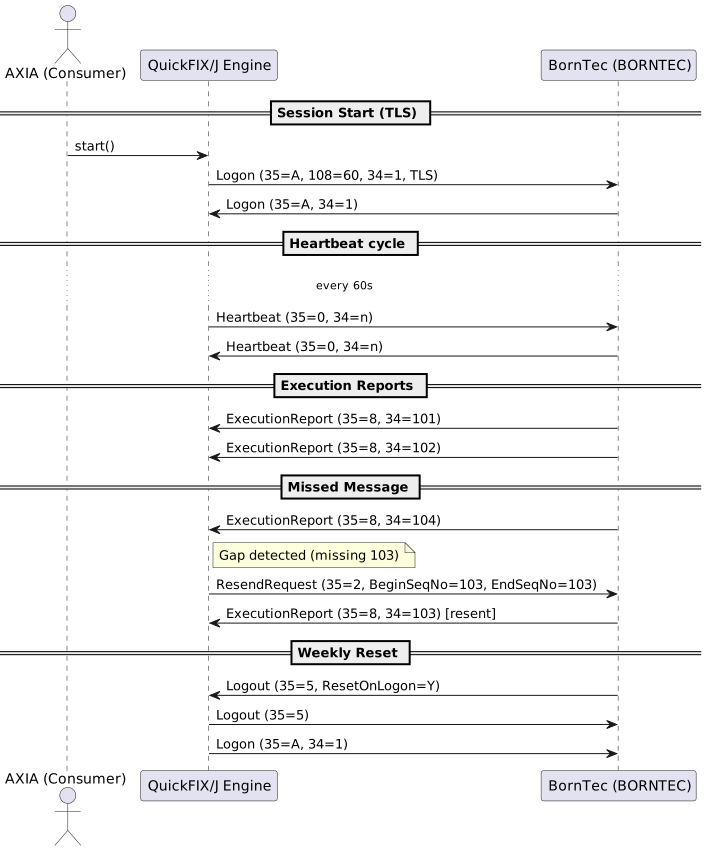
PlantUml Source Code
@startuml
actor "AXIA (Consumer)" as Consumer
participant "QuickFIX/J Engine" as QF
participant "BornTec (BORNTEC)" as Venue

== Session Start (TLS) ==
Consumer -> QF : start()
QF -> Venue : Logon (35=A, 108=60, 34=1, TLS)
Venue -> QF : Logon (35=A, 34=1)

== Heartbeat cycle ==
... every 60s ...
QF -> Venue : Heartbeat (35=0, 34=n)
Venue -> QF : Heartbeat (35=0, 34=n)

== Execution Reports ==
Venue -> QF : ExecutionReport (35=8, 34=101)
Venue -> QF : ExecutionReport (35=8, 34=102)

== Missed Message ==
Venue -> QF : ExecutionReport (35=8, 34=104)
note right of QF : Gap detected (missing 103)
QF -> Venue : ResendRequest (35=2, BeginSeqNo=103, EndSeqNo=103)
Venue -> QF : ExecutionReport (35=8, 34=103) [resent]

== Weekly Reset ==
Venue -> QF : Logout (35=5, ResetOnLogon=Y)
QF -> Venue : Logout (35=5)
QF -> Venue : Logon (35=A, 34=1)
@enduml
Requirements For Implementation
- Configure QuickFIX with connection info.
- Implement a handler that receives Execution Reports.
- Parse the tags into business objects or database rows.
EC2 QuickFIX Consumer Setup (High-Level)
- Instance → t3.small for start (2 vCPU, 2 GB).
- Disk → 20–30 GB gp3 (QuickFIX logs + store are small).
- OS → Use Amazon Linux 2023 (or Ubuntu 22.04).
- Runtime → Install Java 17 + Docker; use QuickFIX/J (Java) inside Docker container.
- Security Group → Allow outbound to BornTec FIX host:port, inbound only for SSH/SSM.
- Time → Keep system clock synced in UTC.
- Volumes → Mount /opt/fix/cfg, /opt/fix/store, /opt/fix/log.
- Config (fix.cfg) settings:
- BeginString=FIX.4.4
- ConnectionType=initiator
- NonStopSession=Y, ResetOnLogon=Y
- HeartBtInt=60, ReconnectInterval=75, MaxMessagesInResendRequest=10000
- FileStorePath=/opt/fix/store, FileLogPath=/opt/fix/log
- DataDictionary=BornTec-FIX-Out-FIX44.xml, ValidateUserDefinedFields=N
- Logs & Store → Persist volumes, rotate logs, retain store files for sequence recovery.
- How to get the data into our system? Extend the Application class → in fromApp() (ExecutionReport 35=8), forward parsed data to your ETL pipeline. QuickFIX/J writes ExecutionReports into a AWS SQS. Python ETL service subscribes to SQS and processes them.
- Smoke Test → On startup:
- See Logon (35=A),
- Heartbeats (35=0) every 60s,
- Execution Reports (35=8) arriving,
- Restart container → missing messages replayed.
Source for BornTec-FIX-Out-FIX44.xml
Connection Configuration
This configuration file defines the session parameters for AXIA (SenderCompID) connecting to BornTec (TargetCompID) over TLS.
Key details:
- FIX version: 4.4
- Session lifecycle: weekly, UTC (ResetOnLogon=Y, NonStopSession=Y)
- TLS: required (SocketUseSSL=Y)
- Host: 69.25.147.112
- Port: 32505 (message from Ed, important: "Note that we don’t have that port turned up yet, but should have it turned up fairly soon.”)
- SenderCompID: AXIA
- TargetCompID: BORNTEC
Location in Docker container:
- Config file: /opt/fix/cfg/borntec-fix.cfg
- Message store: /opt/fix/store
- Logs: /opt/fix/log
# =========================
# QuickFIX/J Initiator cfg: borntec-fix.cfg`
# =========================

[DEFAULT]
# ---- Role & version ----
ConnectionType=initiator
BeginString=FIX.4.4

# ---- Session lifecycle ----
NonStopSession=Y
ResetOnLogon=Y
TimeZone=UTC

# ---- Liveness & recovery ----
HeartBtInt=60
ReconnectInterval=75
MaxMessagesInResendRequest=10000

# ---- Dictionaries ----
UseDataDictionary=Y
DataDictionary=/app/cfg/BornTec-FIX-Out-FIX44.xml
ValidateUserDefinedFields=N

# ---- Persistence & logs ----
FileStorePath=/app/store
FileLogPath=/app/log
# (Optional) FileIncludeMilliseconds=Y

# ---- Connection (Ed provided) ----
SocketUseSSL=Y
SocketConnectHost=69.25.147.112
SocketConnectPort=32505

# ===========================================================
# Primary session
# ===========================================================
[SESSION]
SenderCompID=AXIA
TargetCompID=BORNTEC
After Setup
Public IP address (or multiple) must be provided by us to BornTec to enable traffic.
Contact
Please communicate technical questions and information about Public IP addresses to Ed Bass and others: - Ed Bass ed.bass@borntec.com - CC: Mario Kyriacou <mario@axiatradinggroup.com>; Jennifer Burrows <jburrows@borntec.com>; Alex Haywood (AXIA) <alex@axiafutures.com>; Andy Jennings <andy.jennings@borntec.com>
Please use official zytx.tech email for communicaiton.